
Onboarding a new specialist into your team can be both exciting and challenging, especially when the project involves migrating an Oracle data mart to Snowflake while adopting a Data Mesh concept. For a seamless transition, it’s essential to ensure the new specialist understands the tools, processes, and Snowflake system they’ll work with.
This article breaks down the onboarding process into simple, actionable steps. We’ll cover how to introduce Snowflake data concepts, familiarize them with your existing Oracle data mart, and prepare them for hands-on tasks like creating Snowflake databases, setting up DBT models, and performing Snowflake testing. By following this roadmap, you’ll not only onboard your specialist effectively but also set them up for long-term success.
Think of onboarding a new specialist like teaching someone to switch from driving a manual car to an electric one.
With the manual car (Oracle), they’re used to shifting gears, clutch control, and constant adjustments. The electric car (Snowflake) simplifies things—there’s no clutch, and it’s incredibly efficient. But at first, they might reach for the gear stick out of habit or feel unsure about the lack of engine noise.
Your job is to sit in the passenger seat, explain how the new car works, and let them take a few laps around the track. Show them how source-aligned data products replace manual data workflows and how Snowflake testing is their dashboard for monitoring performance. Before they know it, they’ll be cruising smoothly, wondering how they ever managed without it.
Step 1: Introduce the Data Mesh Concept
Before diving into the technical setup, ensure your new specialist understands the Data Mesh concept. This will be the foundation of their work within the Snowflake system. Here’s how you can break it down:
What is Data Mesh?
In simple terms, Data Mesh is a way of organizing data so that each team or domain is responsible for its own “data product.” Instead of centralizing everything, data is divided into smaller, manageable pieces.
How Your Team Applies Data Mesh
- Source-Aligned Data Products: Data directly from the source system.
- Curated Data Products: Cleaned, enriched, and structured data.
- Consumer-Aligned Data Products: Data tailored to meet specific business needs.
- Reader Data Products: Data with no output, designed for direct connections to reporting tools like Tableau.
Make sure to explain how each data product flows through the Snowflake system, emphasizing the importance of clean and efficient data sharing.
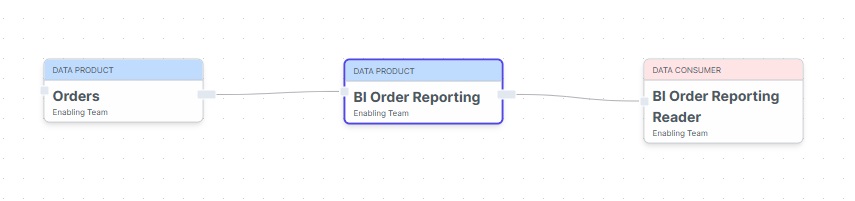
On the example below, the Source Aligned Data Product “Orders” brought the data into the Data Mesh.
Then the Consumer-Aligned Data Product “BI Order Reporting” requested access from the Source DP to be transformed for the BI Reporting purpose.
Last, the Reader Data Product “BI Order Reporting Reader” requested access to the reporting views so it can be configured to Tableau for Dashboard building.
Notice that with the Reader DP as a Snowflake account, it can be controlled the compute expense and charged the Tableau project team properly.
For more information about Data Mesh: The Future of Analytics in Data Mesh: Trends and Opportunities
Step 2: Navigate the Current Oracle Data Mart
Once the specialist is comfortable with the Data Mesh concept, the next step is to familiarize them with the existing Oracle data mart.
Why This Step Matters
Understanding the current structure and data relationships is critical for identifying what needs to be migrated and how it aligns with Snowflake data products.
What They Should Learn
- The schema and key tables in the Oracle data mart.
- How data flows from the source to reporting views.
- By talking to the current specialists, identify issues or bottlenecks that Snowflake could address.
Encourage the specialist to ask questions and document their findings to solidify their understanding.
Step 3: Setting Up the Snowflake Environment
Now comes the exciting part—introducing the Snowflake system and preparing the tools for migration. This step ensures they can work efficiently within the cloud landscape.
Essential Setups
- Consumer-Aligned Data Product: Request the creation of a Snowflake database that aligns with the consumer needs.
- Source-Aligned Data Product: Check for the data availability from the source.
- Git Repository: Set up version control for scripts and configurations.
- Gitlab CI/CD: Understand the pipelines for deployment.
- DBT and Dagster Setup: Help them establish pipelines for transformations and workflows.
- Flyway Configuration: Manage database migrations effectively.
- Snowflake Users for DEV and PROD: Ensure proper access for development and production environments.
Hands-On Tasks
Let the specialist explore these setups to understand how my data flows through the system, how resources are organized, and how access controls work.
Step 4: Reverse Engineer Reporting Views
To replicate reporting views from Oracle to Snowflake, you’ll work backward from the final output. This step helps the specialist understand how to structure data for reporting needs.
Process Breakdown
- Analyze Reporting Views: Study the existing dashboards and the data they rely on. Pick a couple Dashboards to start with.
- Replicate in Snowflake: Recreate these views in the Snowflake database.
- Define DBT Models: Use DBT to transform Snowflake data into the required format.
Outcome
This approach ensures that the Snowflake system delivers accurate and actionable insights, just like the Oracle environment, but with added efficiency.
By having both solutions in parallel, it will be possible to compare the results.
Step 5: Define Incremental Loads
Data loading is a crucial part of every BI process. Incremental loads allow you to handle updates and new data efficiently.
What the Specialist Will Learn
- How to set up incremental data loads in DBT.
- The importance of optimizing load times to reduce compute costs in Snowflake.
- How to ensure data consistency across environments.
Hands-On Example
Start with a simple incremental load job and gradually move to more complex scenarios, reinforcing their confidence in handling Snowflake data.
Step 6: Perform Snowflake Testing
Testing ensures that your Snowflake system is robust and reliable. Introduce the specialist to Snowflake testing techniques for validation and quality assurance.
Key Testing Areas
- Performance Testing: Validate the speed of queries and pipelines.
- Data Accuracy: Ensure the data matches between Oracle and Snowflake.
- Dashboard Validation: Connect Tableau dashboards to reader data products and test the output.
Step 7: Duplicate Tableau Dashboards
To provide a real-world testing scenario, duplicate a few Tableau dashboards and connect them to the reader data product in Snowflake. This step will:
- Verify the accuracy of data transformations.
- Test the integration between Snowflake data and reporting tools.
- Give the specialist confidence in delivering results.
Step 8: Encourage Upskilling and Collaboration
Onboarding can be overwhelming, especially in an unfamiliar environment. To ease the transition:
- Pair the specialist with a junior team member for collaboration.
- Assign small, manageable tasks to build confidence.
- Encourage them to ask questions and share their learnings.
- Keep your weekly face-to-face and listen actively to what they say, build a safe space.
This approach not only helps them adapt but also fosters teamwork and continuous learning.
Building Confidence and Expertise
Onboarding a new specialist into a cloud landscape like Snowflake requires a thoughtful and structured approach. With time and collaboration, your specialist will not only feel confident in the Snowflake system but will also be ready to take on future migrations and projects. This method ensures a smooth onboarding experience while empowering your team to grow together.
What is Data Mesh? Explained and easy to understand!

I’m specializing in Data Integration, with a degree in Data Processing and Business Administration. With over 20 years of experience in database management, I’m passionate about simplifying complex processes and helping businesses connect their data seamlessly. I enjoy sharing insights and practical strategies to empower teams to make the most of their data-driven journey.